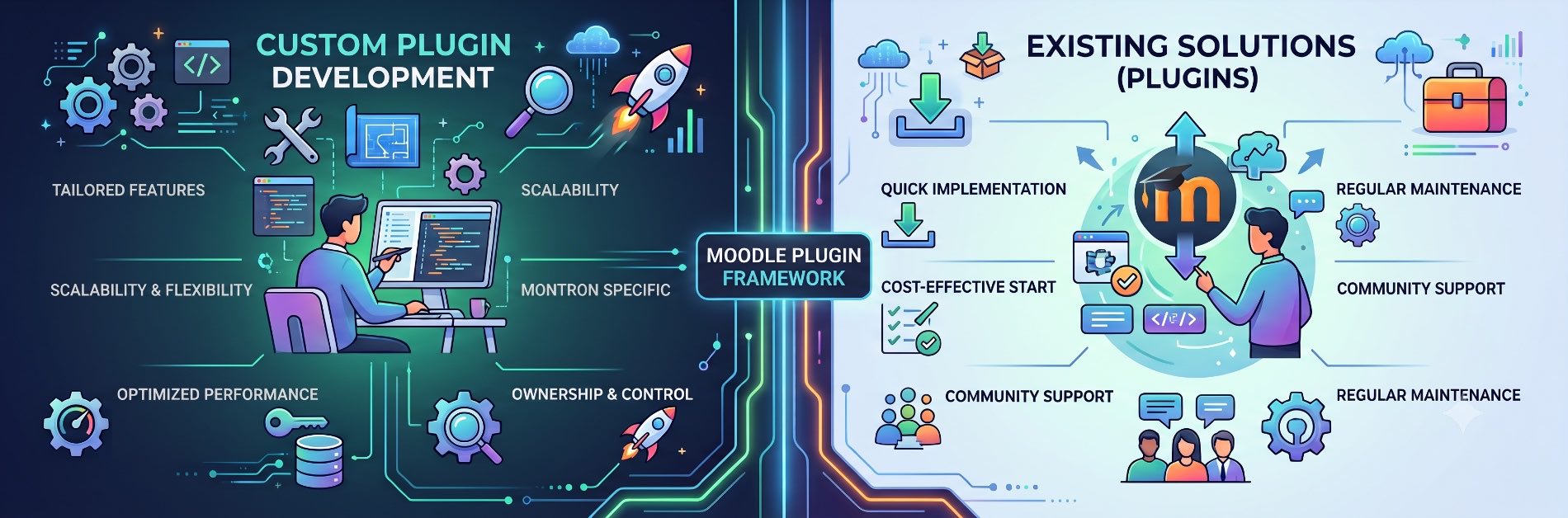
The official extension ecosystem is one of Moodle’s most decisive competitive advantages. With thousands of ready-made extensions maintained by global contributors, institutions can access specialized tools for certification, gamification, and automated reporting in a few clicks. For educational organizations aiming to reduce time-to-market and curb initial development expenditures, selecting an established package from the Moodle plugin directory is often the most direct path forward.
Yet, pre-packaged software inevitably confronts operational boundaries. Off-the-shelf tools are designed to serve standard use cases across a wide range of learning setups. When an enterprise learning provider or university faces complex operational barriers, rigid data governance policies, or bespoke student workflows, general-purpose tools fall short.
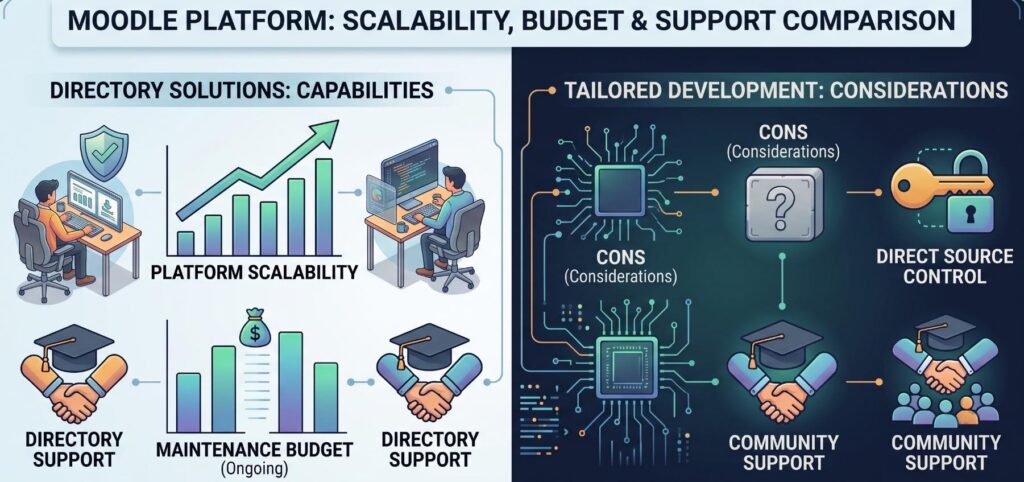
At this juncture, the central architectural debate emerges: Moodle plugin vs custom development. Deciding whether to integrate an off-the-shelf extension or invest in tailored custom Moodle plugin development directly impacts your platform’s scalability, upgrade agility, and ongoing maintenance budget.
1. Audit Native Capabilities Before Modifying Your Platform
Before evaluating third-party code or allocating engineering hours to comprehensive Moodle LMS customization, technical teams must conduct a thorough audit of Moodle core architecture. A significant proportion of platform requests can be resolved natively by using existing configuration options.
Standard Moodle installations contain deep, battle-tested subsystems designed to manage intricate instructional workflows:
- Granular Enrollment Management: Native support for cohort synchronization, manual enrollment, database-driven enrollments, LTI consumer/provider setups, and automated role reassignments.
- Assessment & Gradebook Engines: Standard quiz construction with calculated questions, offline marking workflows, grading rubrics, marking guides, and custom grade aggregation formulas.
- Conditional Access Logic: Restrict access rules based on completion tracking, date ranges, minimum grade thresholds, user profile fields, or nested rule sets.
- Role-Based Access Control (RBAC): Highly customizable role definitions, permission overrides at the context level (system, category, course, activity), and isolated administrative boundaries.
- Automated Event Monitoring: Native event sinks, outbound email notifications, message brokers, and scheduled background tasks via the Moodle Cron API.
Maximizing native capabilities provides long-term stability. Built-in features require zero third-party licensing fees, introduce no external code vulnerabilities, and upgrade seamlessly during major version updates (such as migrating between Moodle 4.x releases and beyond).
2. The Case for the Moodle Plugin Directory: Benefits & Risks
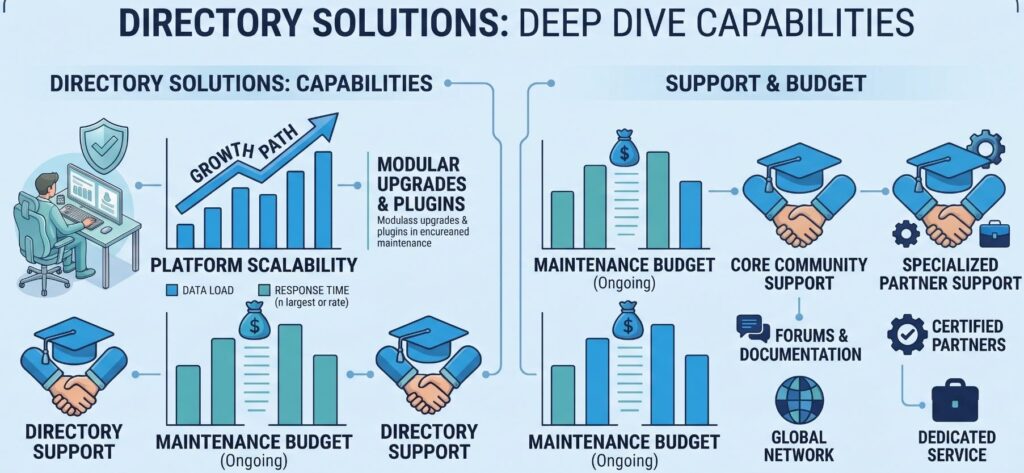
When core functionality cannot fulfill a requirement, exploring the official directory is standard practice. The community repository contains tools engineered by Moodle Certified Partners, independent developers, and academic institutions worldwide.
When to Choose Community Plugins
Relying on an existing community solution is ideal for standard, utility-driven requirements. If your goal is to accept credit card payments via Stripe or PayPal, generate dynamic PDF completion certificates, or connect courses to video conferencing tools like Zoom or BigBlueButton, established plugins provide stable functionality at a fraction of custom development costs.
Technical Vetting Matrix for Third-Party Plugins
Adopting a third-party plugin introduces external code directly into your server environment. To mitigate security liabilities and platform instability, run potential plugins through this evaluation matrix:
| Metric | Acceptance Benchmark | Architectural Risk of Non-Compliance |
|---|---|---|
| Release Frequency | Patched within the last 3–6 months | Vulnerability to unpatched security flaws and zero-day exploits |
| Branch Compatibility | Officially tagged for your active Moodle release | Fatal PHP exceptions, broken hooks, and failed database upgrades |
| Active Installations | Minimum 500+ verified production sites | Untested edge cases; high likelihood of undiscovered defects |
| Moodle Coding Standards | Passes moodlecheck and code-sniffer validations | Memory leaks, unindexed database queries, and site slowdowns |
| Database Architecture | Uses XMLDB schema APIs cleanly | Schema locks and corrupted migrations during site-wide updates |
| Security Hygiene | Follows Moodle Data Validation APIs (clean_param, required_param) | Exposure to Cross-Site Scripting (XSS) and SQL Injection attacks |
| API Compliance | Extends core APIs rather than overriding core classes | High maintenance debt; breaks during routine platform updates |
3. When Custom Moodle Plugin Development Is Essential
General-purpose plugins are engineered to address common, shared problems. However, growing enterprises and universities rarely fit into a standard mold. In several scenarios, investing in custom Moodle plugin development is the only reliable choice.
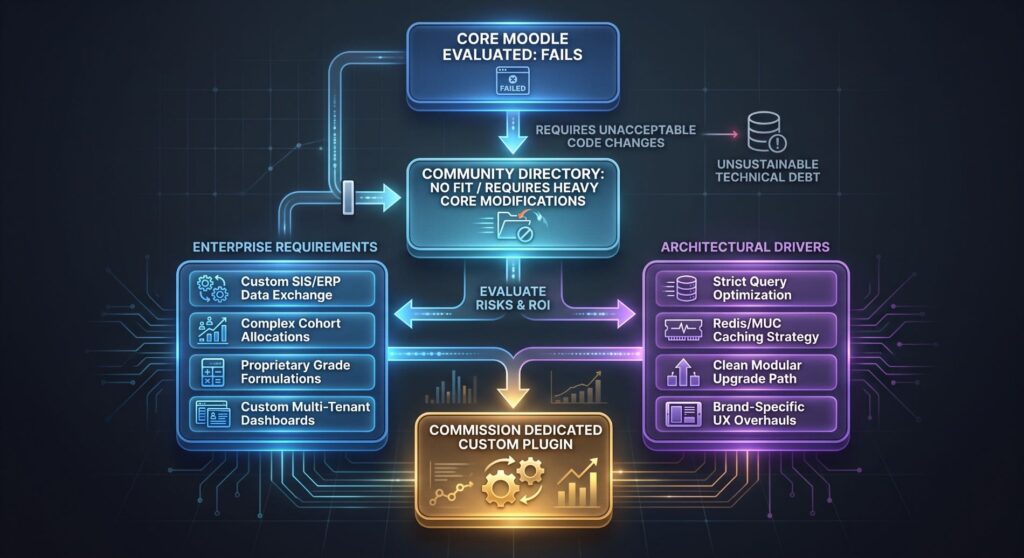
1. Complex Institutional Workflows and Business Rules
Academic institutions and enterprise training divisions operate under distinct operational policies that community plugins cannot handle.
For instance, a polytechnic university may require dynamic enrollment that reads incoming student data from a state admissions system, verifies prerequisites across disparate departments, calculates tuition payment status, and dynamically assigns learners to specific course sections based on regional cohorts. Forcing off-the-shelf tools to handle such complex workflows typically requires disjointed workarounds that break down over time.
2. Eliminating the “Over-Modified Plugin” Anti-Pattern
A frequent mistake in LMS administration is downloading a community plugin and directly editing its source files to bolt on missing features.
Directly altering vendor code creates severe technical debt:
- The Upgrade Trap: The moment the original plugin author issues a patch, updating the plugin will overwrite your changes.
- Security Vulnerabilities: To protect custom modifications, teams often choose to lock the plugin version, leaving the LMS vulnerable to known security exploits.
- Code Bloat: Unchecked customizations introduce unpredictable interactions with Moodle core APIs, making troubleshooting errors difficult.
Building a standalone, custom local plugin that leverages Moodle’s built-in event observers and hooks keeps your custom code isolated and safe during upgrades.
3. Deep and Scalable Custom LMS Integration
Enterprise organizations do not run their learning management systems in isolation. Moodle must communicate cleanly with identity providers, Human Resource Information Systems (HRIS), Enterprise Resource Planning (ERP) platforms like SAP or Oracle, and Student Information Systems (SIS) like Ellucian Banner.
While generic integration tools exist, they frequently fail to meet specialized operational demands. A purpose-built custom LMS integration allows you to:
- Implement complex identity management through OAuth2, SAML 2.0, or custom Single Sign-On (SSO) systems.
- Synchronize bi-directional learner analytics, employee compliance milestones, and certifications with external enterprise databases.
- Manage automated, event-driven data streaming between systems while meeting strict international compliance rules like GDPR and FERPA.
4. Bespoke Academic Logic, Gamification, and Evaluation
Pedagogical models continue to evolve past standard multiple-choice quizzes and forum discussions. Custom development allows teams to implement unique educational mechanics, including:
- Dynamic grade aggregation engines that run specialized institutional formulas.
- Automated learning paths that direct students to remedial or advanced modules based on specific performance markers.
- Custom, interactive activity modules built with modern frontend frameworks (Vue.js, React) integrated cleanly into Moodle via web service endpoints.
5. High-Performance Optimization for Extreme Concurrency
A community plugin that works well on an internal server with 150 concurrent users can cripple an infrastructure hosting 60,000 active students during midterms.
Many off-the-shelf plugins do not prioritize query performance. They may run uncontrolled database loops, execute unindexed queries, or neglect Moodle’s Universal Cache (MUC). With custom plugin development, your software engineers can:
- Write optimized database queries using indexes designed for your specific schema.
- Use Redis or Memcached through the Moodle Universal Cache framework to offload high-frequency database operations.
- Defer resource-heavy processing to background queues via the Ad-hoc Tasks API, keeping the user interface fast and responsive.
6. Fully Tailored User Experience (UX) and Brand Control
Standard community plugins come with their own interfaces, styles, and workflows that rarely align with your organization’s design guidelines. Inconsistent interfaces increase user confusion and drive up support tickets.
Developing custom plugins ensures full ownership of the user interface. Your design team can build responsive layouts that match your custom theme, support modern accessibility standards (WCAG 2.1 AA), and deliver an intuitive learning experience across mobile and desktop devices.
7. Mitigating Abandoned Plugin Liabilities
The open-source ecosystem is dynamic. Independent developers frequently abandon projects when their priorities shift or funding dries up.
If your core academic workflows rely on an unmaintained community plugin, that tool will eventually block your ability to upgrade Moodle, or worse, expose your infrastructure to critical security exploits. Commissioning a custom-built, fully documented internal alternative restores complete control over your software roadmap and eliminates external dependencies.
4. When to Avoid Custom Plugin Development
Custom development is an ongoing commitment, not a one-time project. It requires upfront design, testing, and continuous maintenance. You should avoid custom development when:
- The Request Is Non-Critical: Avoid allocating engineering resources to niche convenience requests that offer minimal educational or business value.
- Native Workarounds Are Sufficient: Minor changes to group configurations, custom profile fields, or conditional access rules often solve edge-case requirements without writing any code.
- Internal Maintenance Resources Are Lacking: If your organization does not have an in-house engineering team or an ongoing retainer with an experienced Moodle development partner, custom code will quickly turn into an unmaintainable liability.
5. Total Cost of Ownership: Moodle Plugin vs Custom Development
A successful build-versus-buy decision requires analyzing the Total Cost of Ownership Moodle implementations accrue over a multi-year operational window. Evaluating only the initial setup expense often leads to inaccurate budget projections.
| Financial & Operational Dimension | Off-The-Shelf Community Plugin | Custom Moodle Plugin Development |
|---|---|---|
| Initial Capital Expenditure (CapEx) | Low to negligible; readily downloadable from the open-source directory. | Moderate to high; requires dedicated architecture, engineering, UI/UX design, and QA testing. |
| Deployment Lead Time | Immediate to days; involves standard administrative installation and configuration. | Weeks to months; requires a complete Software Development Life Cycle (SDLC). |
| Ongoing Engineering Overhead | Minimal; maintenance is largely handled by the open-source project maintainer. | High; your team is fully responsible for security audits, bug fixes, and patch management. |
| Upgrade Adaptability | Passive; your site upgrades remain blocked until the community author updates the plugin. | Active; your team controls the code, updating APIs alongside your scheduled infrastructure migrations. |
| Functional Fit | Rigid; institution must bend its business processes to fit the software design. | Exact; the software is engineered around your organization’s precise workflows. |
| Enterprise Scalability | Variable; often unoptimized for large-scale enterprise deployments. | Optimized; engineered specifically for your database schema, caching layers, and user concurrency targets. |
| Long-Term Financial Risk | Low upfront costs, but potential for unexpected costs if the plugin is abandoned. | Higher initial costs, but stable and predictable multi-year platform expenses. |
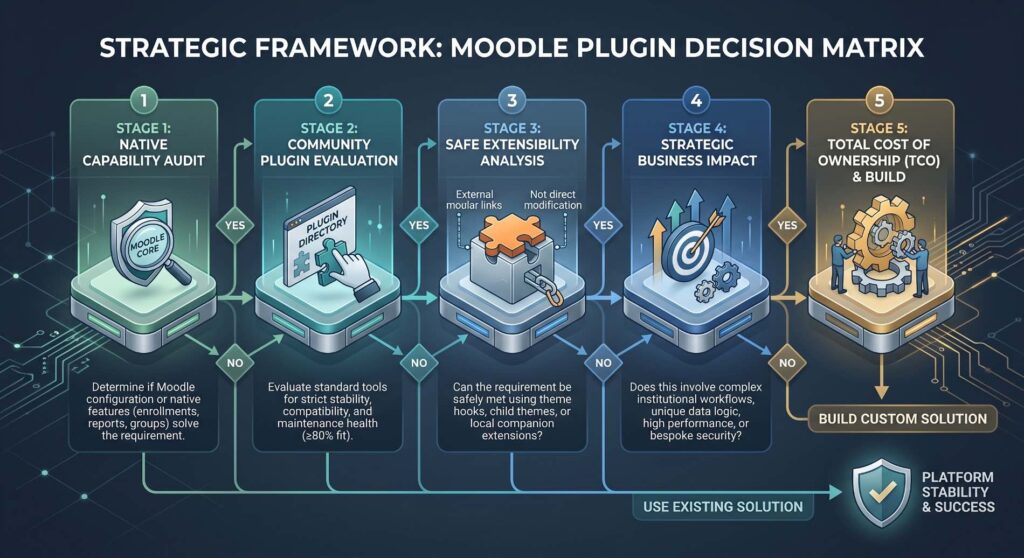
6. Strategic Framework: The 5-Stage Decision Matrix
To help your IT directors, software architects, and academic leaders choose the right path, run all major platform requests through this five-stage evaluation workflow:
Navigating the Five Phases
- Phase 1 (Native Feasibility Audit): Always start by testing configurations in core Moodle. Adjusting course formats, access rules, or custom user profile fields can often solve the core problem without code changes.
- Phase 2 (Community Directory Evaluation): If core features fall short, review the Moodle plugin directory. Vet community plugins using the technical criteria covered in Section 2.
- Phase 3 (Non-Invasive Extensibility Analysis): If an existing plugin is close to what you need, avoid hacking its codebase. Instead, investigate whether Moodle’s built-in hooks, local plugin callbacks, or child themes can bridge the gap cleanly.
- Phase 4 (Business Value & Strategic Impact): Determine if the requested capability provides genuine strategic value. If the workflow is non-essential, modifying your internal operating procedures is far more cost-effective than engineering custom software.
- Phase 5 (TCO Validation): Before writing code, verify that the project’s long-term business value offsets its initial development costs alongside ongoing maintenance, security patching, and platform upgrade testing.
7. Development Best Practices for Custom Moodle Plugins
If your organization chooses custom development, following official architectural standards ensures your software remains secure, stable, and straightforward to maintain:
1. Adopt Moodle’s Architectural APIs
Moodle uses a specialized, modular architecture with established core APIs. Do not build standalone PHP scripts or try to bypass core subsystems.
- Database Access: Always use the
$DBglobal object along with standard XMLDB definitions. Avoid writing raw SQL queries that bypass Moodle’s cross-database compatibility layers. - Security & Form Handling: Use the Form API (
moodleform) to take advantage of native cross-site request forgery (CSRF) protections, input sanitization, and automated data validation. - Navigation & Themes: Register navigation nodes through standard callbacks (
lib.php) so your plugin integrates cleanly with core navigation menus and custom themes.
2. Isolate Custom Logic Using Local Plugins
For broad institutional features that don’t fit specific plugin types (like activity modules, gradebook items, or question types), use the Local Plugin (local_) type. Local plugins allow developers to define isolated database tables, schedule background tasks, observe system events, and expose web services without altering core files.
3. Build with Event-Driven Architecture
Use Moodle’s Event API to listen for system-level triggers (such as course completions, user creations, or assignment submissions) and execute your custom business logic asynchronously. Isolating features behind event observers keeps your system decoupled and protects your customizations from breaking during major Moodle platform upgrades.
Transform Your Digital Learning Ecosystem with RannLab Technologies
Deciding between a community plugin and a bespoke solution requires deep technical expertise and hands-on LMS architectural insight. Attempting to force-fit generic plugins into complex operational workflows risks compounding technical debt, degrading site performance, and frustrating both educators and learners.
RannLab Technologies specializes in end-to-end Moodle LMS development and enterprise e-learning solutions. Whether you need custom Moodle plugin development built strictly to official coding standards, seamless ERP/SIS integrations, or high-concurrency performance tuning for high-traffic environments, RannLab’s dedicated engineering teams deliver secure, upgrade-resilient software tailored to your goals.
Rannlab Technologies
Ready to build an LMS that scales with your institution?
Contact RannLab Technologies today to book a free consultation and project estimate with our Moodle solutions architects.
