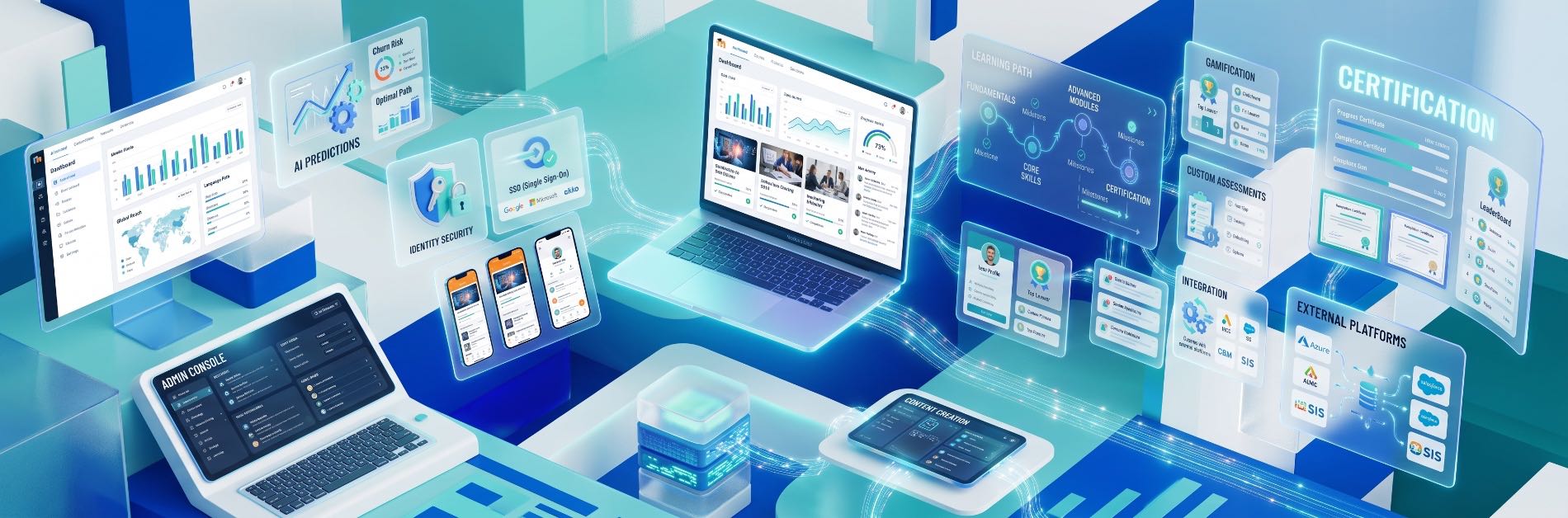
Building an effective digital learning ecosystem requires software that mirrors specific organizational workflows. While standard open-source software provides a stable foundation, off-the-shelf deployments often fall short when scaling. Deploying a custom Moodle LMS bridges this gap, transforming a baseline platform into an intuitive, high-performance training hub.
Whether engineering an LMS for enterprise workforce training or tailoring an academic portal for universities, targeted Moodle LMS customization drives completion rates, simplifies administrative overhead, and unifies learning tech stacks.
Below are the 20 most impactful features to build into your custom learning management system.
Strategic Architecture: Top 20 Custom Moodle Features
1. Role-Based Custom Dashboard
Default dashboards frequently overwhelm users with irrelevant site-wide data. A tailored interface delivers personalized overviews immediately upon authentication:
- Learners: View assigned coursework, pending deadlines, automated progress indicators, and grade summaries.
- Instructors: Monitor class-wide completion rates, pending grading queues, and engagement metrics.
- Administrators: Access high-level user statistics, server performance telemetry, and system-wide enrollment data.
2. Advanced User Management & Dynamic Grouping
Standard user profiles often struggle under complex corporate hierarchies. Upgraded custom Moodle development enables:
- Dynamic cohort assignment based on job title, department, or tenure.
- Multi-tenant architecture allowing separate branches or subsidiary companies to share one infrastructure with isolated data layers.
- Automated de-provisioning and role transitions synced with HR platforms.
3. Enterprise Single Sign-On (SSO)
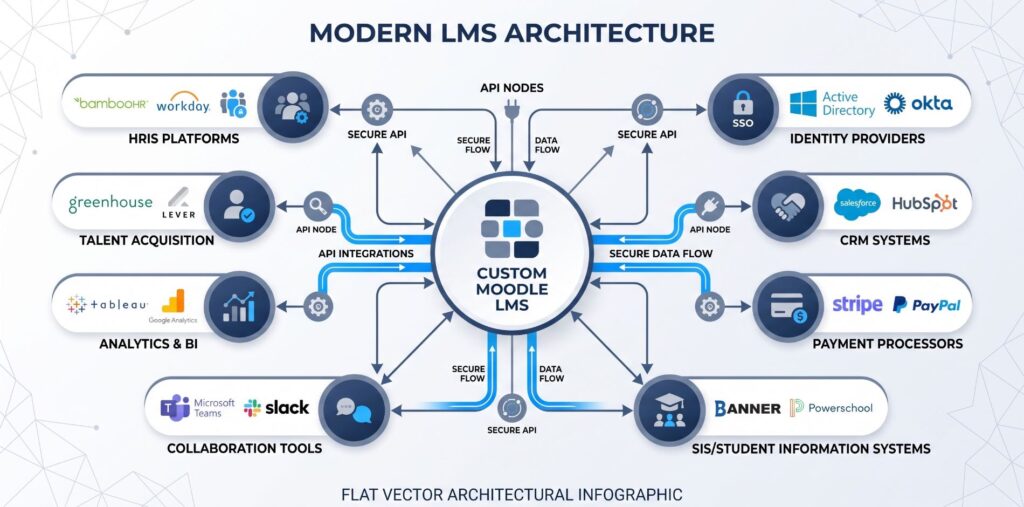
Eliminate password fatigue and fortify corporate data protocols. Integrating modern identity providers (IdPs) via SAML 2.0, OAuth 2.0, OpenID Connect, or Microsoft Azure Active Directory guarantees frictionless, one-click access across all employee workstations.
4. Automated & Conditional Course Enrollment
Manual key distribution creates administrative bottlenecks. Automated enrollment triggers streamline onboarding by:
- Enrolling new hires based on department metadata pulled directly from an active directory.
- Chaining course progressions (e.g., scoring ≥80% on an introductory module auto-registers the student into Level 2).
- Enforcing recurring annual compliance re-enrollments on specific calendar cycles.
5. Custom Analytics and Business Intelligence (BI) Dashboards

While native logs provide raw data, enterprise decisions require actionable insight. Integrating dedicated analytics visualization tools transforms baseline Moodle features into strategic business assets:
| Analytical Layer | Metric Tracked | Organizational Value |
|---|---|---|
| Learner Engagement | Time-in-course, click maps, drop-off rates | Identifies bottlenecks in instructional design |
| Assessment Health | Question-level failure rate, median completion time | Calibrates difficulty and test validity |
| Compliance Tracking | Departmental completion percentages, expiration audits | Mitigates regulatory risk and non-compliance fines |
6. Gamification Mechanics
Sustained learner motivation remains a primary hurdle in digital instruction. Adding structured mechanics directly impacts retention:
- Configurable experience points (XP) awarded for discussion posts, timely quiz submissions, and resource downloads.
- Dynamic tier systems (e.g., Bronze, Silver, Gold) paired with team-wide leaderboards.
- Open Badges 2.0 compliance for external verification and profile sharing.
7. Verifiable Digital Credentials and Automated Certificates
Replace static PDF exports with dynamic, tamper-proof credentials. A custom module can automatically generate branded certificates with unique QR codes, letting employers and compliance bodies instantly verify accreditation on an external validation page.
8. Native Video Conferencing & Virtual Classrooms
Rather than forcing users to juggle external links, native integration with Zoom, Microsoft Teams, or BigBlueButton embeds web conferencing directly inside course timelines. This automates:
- Session scheduling and calendar invites.
- Two-way attendance sync (marking a student “present” only if they stay for ≥75% of the live stream).
- Automatic cloud recording uploads to the course repository.
9. Fully Branded, Offline-Ready Mobile App
Modern learners require omnichannel access. A custom-compiled version of the Moodle mobile application provides:
- Exact brand colors, logos, and custom splash screens.
- Encrypted offline content caching for field workers or traveling students.
- Biometric authentication (FaceID / Fingerprint) for rapid mobile logins.
10. Granular Push Notifications & SMS Triggers
Combat out-of-sight, out-of-mind attrition through rule-based messaging pipelines:
- Browser push alerts for assignments due within 24 hours.
- WhatsApp or SMS escalation for high-priority corporate compliance deadlines.
- Congratulatory triggers following certification achievements.
11. Custom Assessment Engines and Secure Examination
High-stakes testing requires rigorous evaluation tools beyond simple multiple-choice quizzes:
- Algorithmic formula-based questions where numeric variables change for every student.
- Integration with AI proctoring engines to flag anomalous browser tab switches or webcam movements.
- Rubric-driven workflows that distribute anonymous essay grading evenly across a teaching assistant cohort.
12. Multi-Currency Payment Gateway Integration
For training academies and commercial course sellers, monetizing content requires low-friction checkout flows. Custom integrations with Stripe, PayPal, Razorpay, or Authorize.Net enable:
- Instant enrollment upon payment capture.
- Support for recurring subscription models and corporate team seat bundles.
- Automated tax invoicing and localized currency conversion.
13. Sequential Learning Pathways and Prerequisite Chains
Build multi-tiered curriculums with strict rule locks. Learners cannot access advanced simulations until foundational theory modules, safety checklists, and mastery milestones receive verified sign-offs from an instructor.
14. Personalized Content Recommendation Engines
Using learner telemetry, a custom Moodle LMS can suggest supplemental reading, remedial video lectures, or elective tracks. If an engineer repeatedly struggles with database queries in quiz modules, the LMS surfaces targeted micro-lessons before the final exam.
15. Deep Enterprise System Integrations (API & Webhooks)
Break down institutional data silos by linking your LMS directly to core organizational infrastructure:
- HRIS / HCM: Sync employee status changes automatically from Workday, BambooHR, or SAP SuccessFactors.
- CRM: Grant customer onboarding courses immediately upon deal closure inside Salesforce or HubSpot.
- ERP: Match training costs directly against operational department budgets.
16. Embedded Help Desk and Ticketing Systems
Reduce IT friction with an integrated support dock. Users submit context-rich help tickets (which auto-attach the user’s browser version, current URL, and system permissions) directly to your Zendesk, Jira Service Management, or internal ticketing queue without exiting their lessons.
17. Elastic Global Search Architecture
Standard searches often struggle across massive content databases. Integrating Elasticsearch or Apache Solr allows users to run lightning-fast searches across course syllabi, downloadable PDF contents, forum archives, and video transcriptions using fuzzy-matching filters.
18. Dynamic Multi-Language Localization
For multinational enterprises, uniform training requires localized delivery:
- Automated language routing matching the user’s operating system preferences.
- Multi-lingual content toggles enabling a student to switch instructional video subtitles and text on the fly.
- Right-to-Left (RTL) interface support for Arabic and Hebrew locales.
19. AI-Driven Instructional Tools
Modernize administrative and study workflows with responsible AI implementations:
- Automated Question Generation: Instructors input source documentation to generate formative quiz banks instantly.
- Conversational Course Mentors: Sandboxed AI assistants answer student queries strictly using verified course materials.
- Accessibility Enhancers: Instant speech-to-text generation for audio files and automated alt-text tagging for diagrams.
20. Tailored UI/UX & Bespoke Theme Frameworks
Standard templates often feel dated and academic. A custom-built Moodle theme removes extraneous interface clutter, prioritizes intuitive card-based course layouts, adheres to WCAG 2.1 AA accessibility standards, and mirrors your master corporate design system.
Evaluating Feature Priorities: Academic vs. Enterprise Needs
Selecting the ideal feature balance depends on organizational scope. Over-engineering adds technical debt, while under-engineering damages user adoption.

When building an LMS for enterprise, emphasize automation, compliance verification, and HRIS interoperability. Conversely, university environments require deep assessment tools, plagiarism checkers, and SIS gradebook synchronizations.
Technical Considerations for Custom Moodle Development
Before initiating development, assess whether target capabilities are solvable via vetted open-source plugins from the official Moodle Plugins Directory or require dedicated custom code.
- Plugin Maintenance: Relying on too many unvetted third-party plugins creates security vulnerabilities and upgrade roadblocks during major Moodle core updates.
- API-First Architecture: Build custom workflows using Moodle’s native Web Services layer (REST/GraphQL) rather than modifying core database tables directly. This ensures seamless upstream version upgrades.
- Scalability & Hosting: Pair high-concurrency custom features (such as live quizzing and global search) with optimized server configurations, using Redis for object caching and dedicated database clusters.
Frequently Asked Questions (FAQ)
What is the primary advantage of a custom Moodle LMS over standard Moodle?
A standard Moodle installation provides basic educational tools, but a custom Moodle LMS adapts the platform to your specific business logic. Customization allows organizations to streamline user management, automate reporting, match corporate branding, and connect directly with existing software ecosystems like CRMs and HR systems.
Can custom features survive future Moodle core updates?
Yes, provided development adheres strictly to Moodle standards. By implementing features via modular plugins, local plugins, and official APIs—without modifying the Moodle core codebase—your customizations remain functional and easy to maintain when upgrading versions.
How does enterprise SSO improve LMS security?
Enterprise SSO centralizes access control inside your corporate identity provider (such as Azure AD or Okta). If an employee leaves the company, revoking their primary corporate account instantly cuts their LMS access, preventing orphaned accounts and unauthorized data exposure.
Maximizing Value from Your Moodle Ecosystem
Investing in custom Moodle development transforms an off-the-shelf learning portal into an automated, highly scalable training environment. By prioritizing user experience, enterprise interoperability, and automated workflows, organizations can lower training costs, ensure regulatory compliance, and deliver measurable learning outcomes.
Plan your deployment by identifying operational bottlenecks, consulting key stakeholders across IT and instructional design, and selecting the optimal blend of native plugins and custom-engineered features.
Contact Us Today.
