Moodle is one of the world’s most versatile, open-source Learning Management Systems (LMS), powering educational institutions, universities, and enterprise corporate training programs globally. However, deploying an enterprise-grade platform requires far more than running a default installation script.
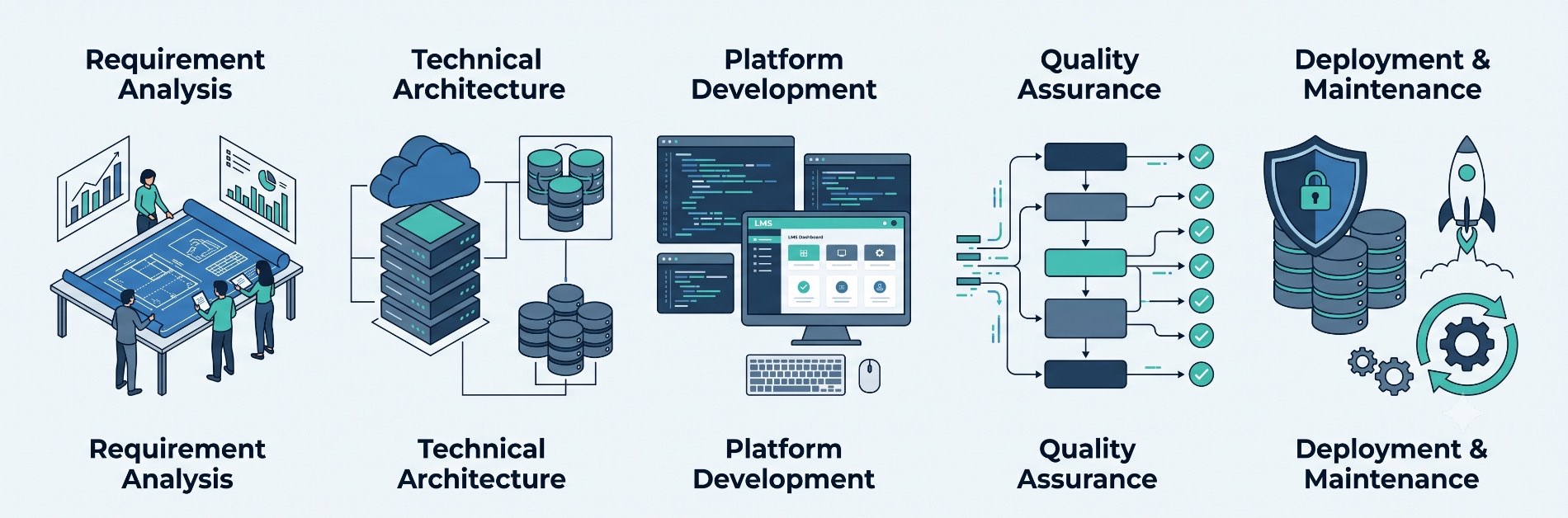
A systematic Moodle LMS development process ensures your platform is secure, highly scalable, compliant, and tailored to organizational workflows. This comprehensive technical guide walks you through every stage of the development lifecycle—from scoping requirements and architecting high-concurrency infrastructure to writing modular plugins, integrating APIs, and managing continuous maintenance.
1. Requirement Analysis & Technical Scoping
Every successful deployment begins with exhaustive discovery. Skipping this stage often leads to technical debt, scope creep, and architectural rework.
Defining Key Stakeholders & Workflows
- Target Audience: Identify whether the platform caters to K-12 learners, higher education students, compliance-driven enterprise staff, or external commercial clients.
- Concurrency Demands: Distinguish between registered accounts and concurrent peak active users (e.g., synchronous exam scenarios require significantly more database and CPU throughput than self-paced video lessons).
- Course Formats: Determine the media format—SCORM packages, xAPI/cmi5, interactive H5P modules, or native Moodle gradebook assessments.
Functional Requirements Checklist
To finalize specifications, gather answers to these operational criteria:
- Authentication Methods: Will users log in via Single Sign-On (SAML 2.0, OAuth2, Microsoft Entra ID, OpenID Connect) or local database accounts?
- Automated Enrollments: How are users placed into courses (dynamic rules, cohort sync, or external HR feeds)?
- Data Reporting Requirements: Does management need custom SQL reports, native Moodle analytics, or real-time streaming into an external Business Intelligence (BI) tool like PowerBI?
2. Planning the Moodle Architecture & Scalability
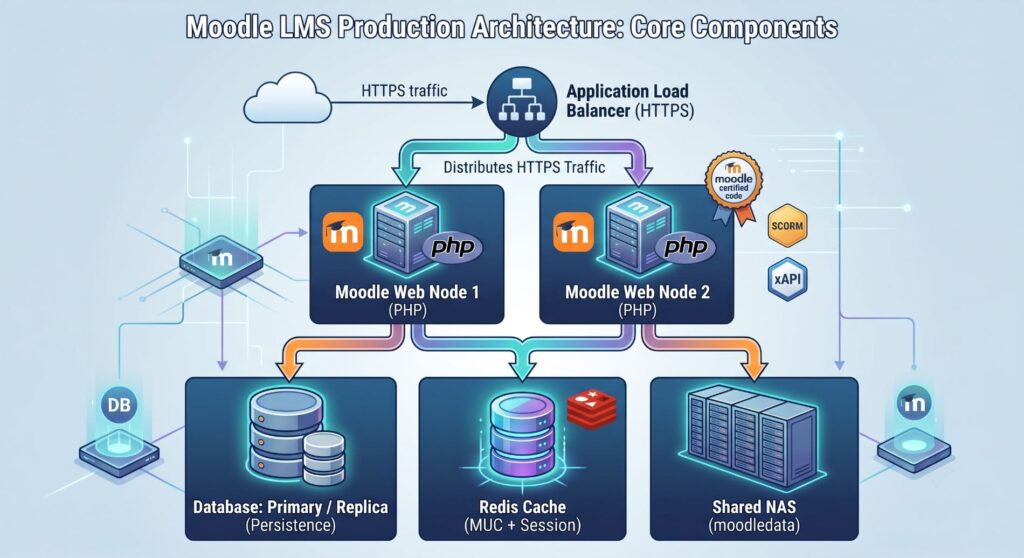
Moodle’s standard LAMP/LEMP stack scales effectively when properly partitioned across discrete services rather than bundled into a single virtual server.
| Architecture Layer | Recommended Technology Stack | Production Best Practice |
|---|---|---|
| Web Server | Nginx or Apache (Worker MPM) | Terminate SSL at load balancer; configure HTTP/2. |
| Runtime | PHP 8.1+ (PHP-FPM) | Tune opcache.memory_consumption (256MB–512MB) and pm.max_children. |
| Database | PostgreSQL or MariaDB / MySQL | Use dedicated DB clusters, read replicas, and fast SSDs/NVMe storage. |
| Caching Layer | Redis or Memcached | Implement Redis for Moodle Universal Cache (MUC) and session storage. |
| Shared Storage | AWS EFS, GlusterFS, or NFS v4 | Dedicated directory for moodledata with optimized I/O throughput. |
3. Environment Provisioning & Installation
Strict development isolation prevents configuration drifts and deployment failures. Always maintain three synchronized tiers: Development (Local/Dev), Staging (UAT), and Production.
Standard Setup Procedures
- Source Control: Clone Moodle via official Git branches rather than downloading raw archives. This simplifies applying upstream security patches.
- Directory Isolation: Ensure your webroot (
/var/www/html/moodle) is separate from your data directory (/var/www/moodledata). Never exposemoodledatadirectly through web server paths. - Cron Job Execution: Configure system crontab (
* * * * * php /var/www/html/moodle/admin/cli/cron.php) to execute every minute, ensuring timely notification dispatches, badge allocations, and forum updates.
4. Configuring Native Moodle Core Features
Before writing custom code or installing third-party tools, configure Moodle’s extensive built-in engine. Adhering to native features minimizes technical overhead during major version upgrades.
- Hierarchical Categories: Structure course containers systematically by department, semester, or skill vertical.
- Granular Role-Based Access Control (RBAC): Clone existing system roles (Manager, Teacher, Student) rather than altering core permissions directly.
- Conditional Activity Completion: Chain learning paths by locking downstream modules until upstream assessments meet specific passing grades.
5. UI/UX Customization & Theme Development
A cluttered learning interface decreases course completion rates. Modern Moodle frontend development utilizes Mustache templates, Bootstrap, and SASS.
Best Practices for Moodle Theming
- Create a Child Theme: Always extend standard themes like
theme_boostrather than editing core styling files directly. - Responsive Layouts: Design layouts with modern mobile navigation breakpoints, sticky headers, and collapsible side drawers to keep content front-and-center.
- Accessibility (WCAG 2.1 AA): Verify contrast ratios, support keyboard navigation throughout the course index, and mandate semantic HTML markup for custom course layouts.
6. Vetting & Installing Verified Plugins
The Moodle Plugins Directory offers thousands of community modules. However, unvetted plugins are a leading cause of performance degradation and security vulnerabilities.
Evaluation Criteria Before Plugin Installation
- Compatibility: Does the plugin explicitly support your target Moodle core version?
- Release Cadence: Has the plugin received bug fixes and commits within the last 3–6 months?
- Community Rating & Usage: Does it have active adoption, verified maintainers, and resolved tracker issues on GitHub or Moodle Tracker?
- Database Impact: Inspect whether the plugin executes unindexed SQL queries or installs heavy event listeners that slow down page requests.
7. Custom Plugin Development
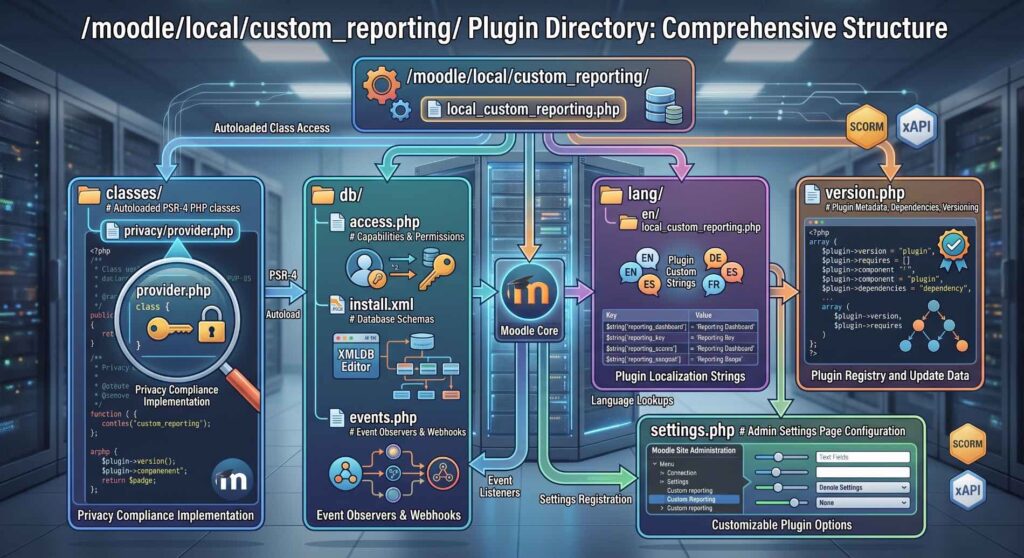
When out-of-the-box functionality and existing plugins fall short, building a custom plugin ensures the system matches your exact business rules.
Development Guidelines
- Follow Moodle Coding Styles: Comply with Moodle’s PSR-12-based standards and pass code checks using
phpcsand Moodle Code Checker. - Use Supported APIs: Leverage the Database API (
$DB), Form API, Event API, and Privacy API (for GDPR compliance). - Never Modify Core Files: Core changes create merge conflicts during updates and expose your application to unpatched vulnerabilities. Always hook in via standard plugin types (
local/,mod/,block/,enrol/,auth/).
8. Third-Party Integrations via APIs
Modern LMS ecosystems run connected with broader enterprise software. Moodle provides an extensive Web Services API supporting REST, SOAP, and GraphQL patterns.
- Identity Providers (IdP): Centralize account lifecycle management with Microsoft Azure AD/Entra ID, Okta, or Google Workspace via OAuth 2.0.
- CRM & ERP Systems: Synchronize employee certifications, course billing, and completion statuses back to Salesforce, SAP, or Workday.
- Web Conferencing: Connect Zoom, Microsoft Teams, or BigBlueButton via LTI (Learning Tools Interoperability) 1.3 Advantage standards for secure launch flows and roster synchronization.
9. Mobile App Customization & Offline Learning
Mobile accessibility is essential for distributed workforces and campus communities.
- Standard Moodle App: Leverage the default open-source application with custom CSS overrides configured straight from the Site Administration dashboard.
- Custom Branded App: Compile a proprietary build of the Ionic-based Moodle Mobile app, enabling custom bundle IDs, tailored splash screens, enterprise push notification certificates, and MDM (Mobile Device Management) distribution.
- Offline Progress Synchronization: Support offline content downloads and local quiz attempts that automatically sync with the server once connectivity resumes.
10. Enterprise Security & Hardening Protocols
Protecting personally identifiable information (PII) and academic records requires comprehensive, multi-layer security.
System Hardening Measures
- Strict Transport Security (HSTS): Enforce HTTPS site-wide by configuring
$CFG->sslproxy = true;(when terminating at proxy) and issuing strict TLS 1.3 certificates. - File Permissions: Lock webroot file permissions to read-only for the web user (
chmod 755for directories,644for files). Ensure onlymoodledatahas runtime write permissions. - Content Security Policy (CSP): Mitigate cross-site scripting (XSS) attacks by whitelisting trusted external scripts and media domains.
- Session Protection: Enable IP check locks and enforce rotating session IDs on privilege escalations to stop session hijacking.
11. Rigorous QA, Performance Testing & Auditing
A successful deployment relies on systematic verification across diverse environments.
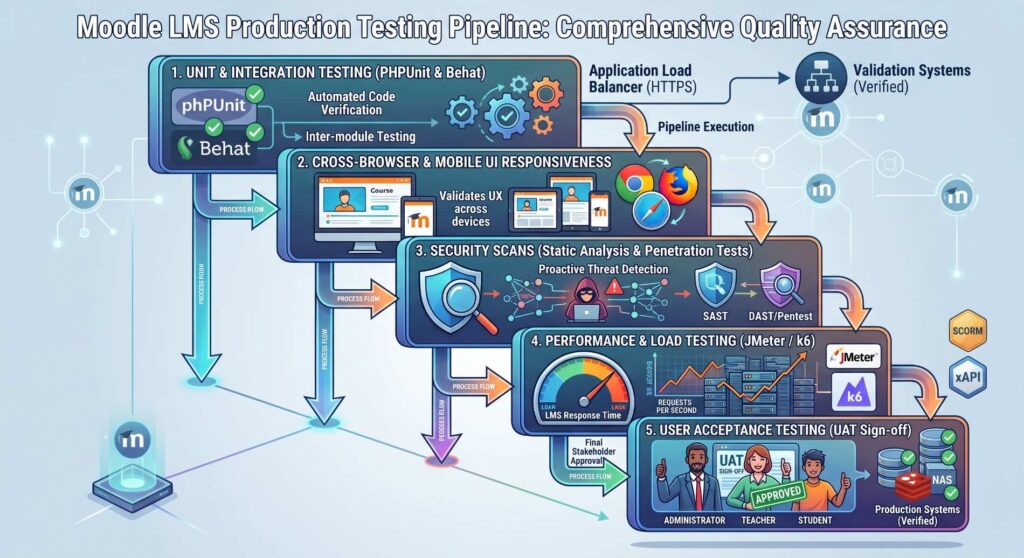
- Automated Testing: Run continuous integration suites with PHPUnit for backend logic and Behat for end-to-end browser workflows.
- Stress & Load Testing: Use Apache JMeter or k6 to simulate real-world concurrency (e.g., 5,000 students submitting a timed quiz within a 10-minute window). Monitor CPU throttling, database thread pool exhaustion, and memory leaks.
- User Acceptance Testing (UAT): Involve actual instructors, students, and system administrators to validate course design, assignment submissions, and grading workflows.
12. Data Migration Strategy
Migrating legacy databases requires careful mapping to preserve data integrity and historical compliance.
- Source-to-Target Data Mapping: Map historical users, grades, activity completion states, and media records from platforms like Canvas, Blackboard, or older Moodle versions into normalized relational formats.
- Automated Migration CLI Scripts: Use Moodle’s command-line interface (CLI) to bulk-upload users and restore course backups (
.mbzfiles) without encountering web server HTTP timeout issues. - Verification & Audit Trailing: Run cryptographic checksums and cross-table queries post-migration to confirm no student transcript or gradebook calculation was corrupted in transit.
13. Production Deployment & CI/CD Pipelines
Eliminate manual FTP uploads. Deploy Moodle utilizing modern DevOps automation:
- Containerization: Package applications using Docker and orchestrate with Kubernetes or AWS ECS for elastic, on-demand scaling.
- Zero-Downtime Releases: Implement blue-green or rolling deployment strategies. When schema updates require Moodle’s maintenance mode, execute database migrations through the native CLI (
php admin/cli/upgrade.php) during scheduled off-peak maintenance windows. - Automated Health Checks: Monitor synthetic transactions (e.g., automated pinging of the login page and primary course dashboard) via Uptime Robot, Datadog, or New Relic.
14. Documentation & Stakeholder Training
A technically sound LMS will still underperform if users struggle with basic features. Provide customized, role-specific documentation to support smooth adoption:
- Administrator Manuals: Configuration guides detailing automated cron jobs, backup recovery workflows, key rotations, and SSO setup.
- Instructor & Course Creator Guides: Practical guides for gradebook weightings, rubrics, question bank categorization, and interactive H5P authoring.
- Learner Onboarding: Short video walk-throughs covering mobile app configuration, quiz attempts, and submission portals.
15. Maintenance, Optimization & Upgrades
Moodle requires proactive lifecycle management to remain secure and performant.
Maintenance Routine
- Weekly Operations: Audit scheduled backups, verify cron task runtimes, review server error logs, and monitor cache hit rates.
- Monthly Patching: Apply minor upstream point releases (e.g., upgrading from 4.3.1 to 4.3.2) to patch security vulnerabilities.
- Annual Major Upgrades: Plan major version transitions in a staging environment. Verify third-party plugin compatibility, run database optimization routines, and test custom plugins against new core APIs before updating production.
Project Timeline: Typical Implementation Roadmap
The duration of a Moodle LMS rollout depends on the level of customization and external integration involved:
| Project Phase | Estimated Duration (Standard Deploy) | Estimated Duration (Custom Enterprise) |
|---|---|---|
| Discovery & Architecture | 1–2 Weeks | 3–4 Weeks |
| Core Setup & Theming | 2 Weeks | 3–5 Weeks |
| Custom Plugins & APIs | 1–2 Weeks | 6–10 Weeks |
| Data Migration & QA | 1–2 Weeks | 3–4 Weeks |
| Deployment & Training | 1 Week | 2 Weeks |
| Total Turnaround | 6–9 Weeks | 17–25 Weeks |
Frequently Asked Questions (FAQ)
Is Moodle suitable for enterprise corporate training?
Yes. With native cohort management, role-based workflows, dynamic learning plans, and custom plugin support, Moodle scales effectively for corporate compliance, onboarding, and customer training.
How much does it cost to build a custom Moodle LMS?
While Moodle’s core software is open-source and free, development costs vary based on hosting infrastructure, custom theme design, custom plugin development, third-party system integrations, and ongoing support agreements.
Can Moodle handle 50,000+ concurrent learners?
Yes. Achieving this scale requires a multi-node, horizontally scalable architecture featuring a load balancer, stateless PHP-FPM web nodes, dedicated Redis caching clusters, read-replica databases, and assets distributed through a Content Delivery Network (CDN).
Summary
Executing an effective Moodle LMS development process requires balancing native features, security best practices, and targeted custom development. Prioritizing Moodle’s core architecture, testing with real-world user loads, and maintaining automated deployment pipelines ensures your platform stays secure, reliable, and ready to scale with your organization’s learning needs.
