
The landscape of ecommerce SEO is experiencing a seismic shift. We are moving away from the days of simple ten-blue-links and entering the era of generative AI search. For online retailers, this means traditional keyword strategies are no longer enough. The new holy grail for visibility is getting your products featured as direct recommendations by AI models. Specifically, appearing in Gemini shopping briefs can mean the difference between remaining invisible and becoming the top-recommended choice for highly motivated buyers.
If you are a small to medium-sized brand, this might sound intimidating. You might assume that optimizing for artificial intelligence requires a team of data scientists, complex schema markup coding, and massive technical budgets. Fortunately, this is a misconception.
The truth is, Gemini does not read code; it reads data. And the primary data source Google uses to populate its AI shopping recommendations is a tool you likely already use: Google Merchant Center.
In this comprehensive, no-code guide, we will explore the simple, immediate tweaks you can make to your product feed. These adjustments require absolutely zero programming knowledge but will drastically improve how Google’s AI understands, values, and ultimately recommends your products in Gemini shopping briefs.
What Are Gemini Shopping Briefs and Why Should You Care?
Before we dive into the “how,” it is crucial to understand the “what” and the “why.”
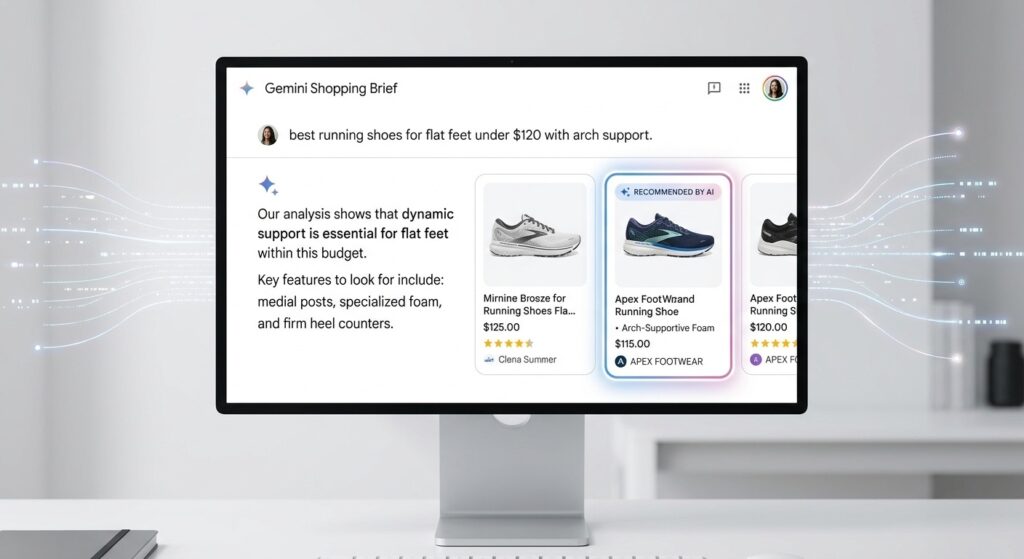
When a user asks Google’s AI a complex, multi-layered question like, “What are the best lightweight running shoes for flat feet under $130?” the AI does not just return a list of links. It synthesizes information across the web to create a cohesive, conversational summary. This summary—often presented at the top of the search results or directly within the Gemini chat interface—is what we refer to as an AI shopping brief.
These briefs do a few critical things:
- They interpret intent: The AI understands that the user wants a shoe that is lightweight, specifically designed for flat feet (requiring arch support or stability), and budget-conscious.
- They curate options: The AI scans millions of products to find those that precisely match these criteria.
- They provide citations: Most importantly for ecommerce owners, the AI provides product cards and links to the stores where these items can be purchased.
Being cited in Gemini shopping briefs is a massive conversion driver because the AI does the heavy lifting of building trust. The user feels as though a knowledgeable personal shopper has vetted your product.
The Engine Behind the AI: Google Merchant Center

To get into these briefs, you must understand where Gemini gets its shopping data. While it does crawl standard website text, its primary source of truth for physical products is the Google Shopping Graph.
The Google Shopping Graph is a dynamic, AI-enhanced dataset of billions of products, sellers, brands, reviews, and inventory data. And how do you feed data directly into the Shopping Graph? Through Google Merchant Center (GMC).
If your Merchant Center feed is messy, incomplete, or ambiguous, the AI will ignore your products in favor of competitors who have clearly defined their items. Optimizing your GMC feed is the ultimate no-code strategy for AI visibility. You are simply organizing your data in a way that an AI model finds irresistible.
Foundational Tweaks: Setting Up for AI Success
Before optimizing individual products, we need to ensure your account foundation sends the right “trust signals” to Google. AI models prioritize trustworthy, transparent, and user-friendly sellers.

1. Transparent Shipping and Return Policies
One of the most common reasons AI will skip over a product is a lack of clear shipping and return data. When Gemini crafts a shopping brief, it wants to recommend a seamless experience. If it cannot guarantee how much shipping will cost or if a product can be returned, it will hesitate to suggest it.
- The No-Code Fix: Log into your Google Merchant Center account. Navigate to the “Shipping and returns” section. Clearly define your shipping rates (or set up free shipping rules) and your return windows. Be as accurate as possible.
2. Tax Information Accuracy
Similarly, hidden costs lead to bad user experiences, which AI models are trained to avoid. Ensure your tax settings in GMC perfectly match the reality of what a customer will pay at checkout.
3. Business Information Completeness
Fill out every single field in your business profile. Add your customer service email, phone number, and physical address. Connect your social media profiles if the platform allows. These act as entity validators, proving to the AI that you are a legitimate, operational business.
Optimizing Your Product Feed for Gemini (No Code Required)
Now we get to the core of the strategy: optimizing the feed itself. You can do this via your ecommerce platform’s native Google app (like the Google channel in Shopify) or by editing your feed spreadsheet directly.
Mastering the Product Title (The AI’s First Glance)
In traditional SEO, you might stuff keywords into a title to catch broad searches. In AI SEO, precision is everything. The AI needs to instantly categorize your product.
Your product title is the single most heavily weighted attribute in your feed. A bad title guarantees you will not appear in Gemini shopping briefs.
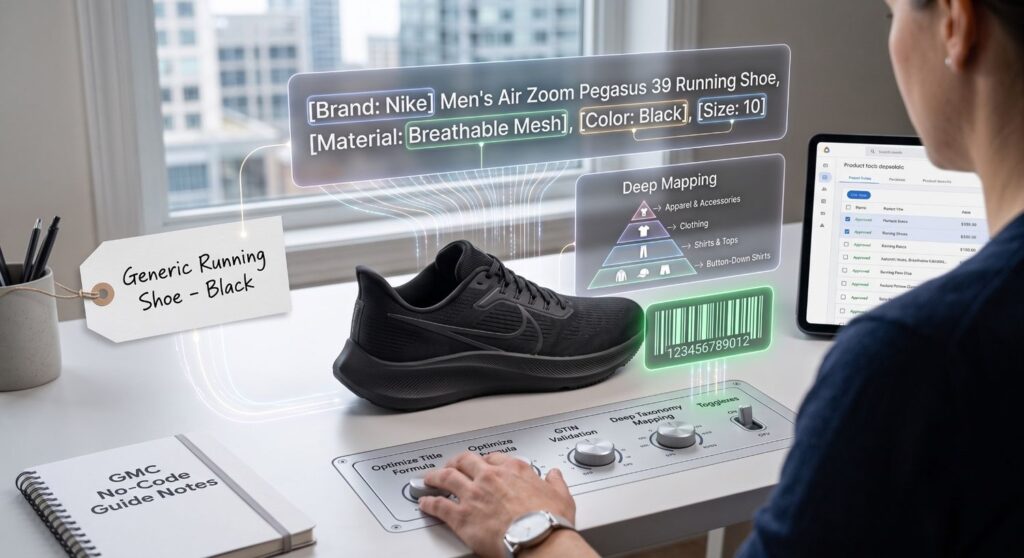
The Ideal Title Formula: Do not write titles for a creative catalog; write them for a database. A proven formula across most verticals is: Brand + Attributes (Size, Weight, Material) + Product Type + Gender (if applicable) + Color
Example:
- Bad Title: The Cloud Walker
- Good Title: Nike Men’s Air Zoom Pegasus 39 Running Shoe, Breathable Mesh, Black, Size 10
Why this works for AI: When a user asks Gemini for “breathable black running shoes for men,” the AI immediately matches the exact entities (Men, Running Shoe, Breathable, Black) in your optimized title. There is zero ambiguity.
Crafting Descriptions that AI Can Digest
Many brands treat product descriptions as an afterthought in their feed, often copying and pasting fluffy marketing copy. Gemini, however, uses the description to extract secondary features, benefits, and specifications that weren’t included in the title.
How to structure your description for AI:
- Front-load the most critical information: Put the most important functional features in the first two sentences.
- Use natural language: AI models are trained on natural human conversation. Write clearly and concisely.
- Include physical specifications: Dimensions, materials, care instructions, and compatibility.
- Avoid promotional jargon: Phrases like “Buy now!” or “Number one best seller” waste space and are ignored by the AI’s natural language processing algorithms.
If you sell a standing desk, your description shouldn’t just say, “Elevate your workflow with our amazing desk.” It should say, “Electric dual-motor standing desk with a bamboo top. Adjustable height range from 28 inches to 48 inches. Supports up to 250 lbs. Features a programmable keypad with 4 memory presets.” When a user asks Gemini for a “heavy-duty bamboo standing desk,” your highly specific description ensures you are part of the answer.
The Power of Product Identifiers (GTINs, MPNs, Brands)
If there is a secret weapon for getting cited in Gemini shopping briefs, it is Global Trade Item Numbers (GTINs).
Think of a GTIN (like a UPC or EAN barcode) as a product’s social security number. It is absolute proof of what the item is. When you provide a GTIN, Google’s AI can instantly connect your product to all the other data it has on the web about that exact item—including global reviews, manufacturer specifications, and safety ratings.
The No-Code Fix: Never leave the GTIN, Manufacturer Part Number (MPN), or Brand fields empty if they exist for your product.
- If you are a reseller, look at the barcode on the box and enter those numbers into your feed.
- If you manufacture your own products, buy legitimate GS1 barcodes for them.
Products with valid GTINs are exponentially more likely to be featured in AI summaries because the AI has absolute confidence in the product’s identity.
Product Categories and Google Taxonomy
When you set up a store, you categorize products for your website navigation (e.g., Home > Summer Collection > Shirts). Google has its own categorization system called the Google Product Taxonomy.
You need to map your products to Google’s specific categories so the AI understands exactly where your item fits in the broader retail universe.
The No-Code Fix: Do not just use top-level categories. Drill down as deep as possible.
- Okay:
Apparel & Accessories > Clothing - Excellent:
Apparel & Accessories > Clothing > Shirts & Tops > Button-Down Shirts
The deeper and more specific your taxonomy category, the easier it is for the AI to retrieve your product for a highly specific query in a Gemini shopping brief.
Visuals and AI: How Gemini Interprets Your Images

You might think that because Gemini is primarily a text-based AI (in its chat interface), images don’t matter. This is incorrect. Gemini is a multimodal model, meaning it can process and “understand” images just as well as text.
Furthermore, when Gemini generates a shopping brief, it pulls the primary image from your Merchant Center feed to create the product card. If that image is poor, users won’t click, and the AI will eventually stop recommending it.
Image Optimization Rules for AI:
- The “White Background” Rule is Still King: Your
image_link(the main image) must feature the product on a solid white or transparent background. AI computer vision models use edge-detection to understand the shape and boundaries of an item. Cluttered backgrounds confuse the model. - No Promotional Text or Logos: Do not put “Sale 20% Off” or your company logo over the product image. Google’s systems will actively penalize or disapprove these images, guaranteeing you will not appear in AI briefs.
- Use
additional_image_linkfor Context: While the main image should be clean, use the additional image fields to provide lifestyle context. Show the product in use, show it from multiple angles, and show its scale. The AI scans these images to confirm the product’s features (e.g., if your description says “features a hidden pocket,” a photo showing that pocket validates the claim).
Leveraging Custom Labels for Strategic Visibility

Custom labels (custom_label_0 through custom_label_4) are fields in your Merchant Center feed that you can use to group products anyway you like. While traditional paid search managers use these for bidding strategies, they have a hidden benefit for AI optimization.
By carefully grouping your products—even if just for your own organization—you ensure that your feed remains hyper-relevant.
Examples of No-Code Custom Labels:
- Seasonality: Labeling items “Winter 2024” or “Summer Essentials.”
- Performance: Labeling your best sellers as “High_Volume.”
- Profitability: Labeling items “High_Margin.”
While Gemini might not read the custom label directly to rank a product, keeping your feed cleanly organized allows you to easily filter and update attributes for specific groups of products during seasonal shifts. If users are suddenly asking Gemini for “fall sweaters,” and you have easily updated your “Fall” custom label group with fresh titles and descriptions, you will beat slower competitors to the punch.
The Role of Automated Feed Apps
If you are using Shopify, WooCommerce, BigCommerce, or Magento, you do not need to manually edit spreadsheets to optimize your feed. This is where the “no-code” promise truly shines.
There are numerous apps designed to act as translators between your store and Google Merchant Center.
Top No-Code Feed Tools:
- Simprosys Google Shopping Feed (Shopify): Incredible for easily mapping fields, assigning GTINs in bulk, and fixing Google taxonomy errors without writing a line of code.
- Feedonomics (Enterprise): A more robust platform that automatically optimizes titles and descriptions based on best practices.
- Channable: Great for creating logic-based rules (e.g., “If title does not contain color, add color to the end of the title”).
By leveraging these visual, drag-and-drop tools, you can implement all the strategies mentioned above—title formulas, taxonomy mapping, description formatting—across thousands of products in a few clicks.
Product Ratings and Reviews: The Trust Signals Gemini Craves

Artificial Intelligence is heavily biased toward consensus. If an AI model is going to stick its neck out and recommend a product to a user in a shopping brief, it wants to be sure that the product is actually good. How does it know? Ratings and reviews.
Products with high star ratings and abundant textual reviews are significantly favored in Gemini shopping briefs.
How to get this data into your feed:
- Opt into Google Customer Reviews: This is a free program you can activate within Merchant Center. It prompts customers to review their experience after a purchase.
- Aggregate your Product Reviews: If you use a review app like Yotpo, Loox, or Judge.me, ensure you have enabled the integration to syndicate your product reviews to Google.
- Focus on Review Text: It is not just about the 5-star rating. Gemini analyzes the text of the reviews to understand real-world performance. If users consistently write, “These shoes are incredibly comfortable for my flat feet,” the AI will ingest that specific phrase and use it to match the product when someone explicitly asks for flat-foot solutions.
Pricing and Promotions: Getting the “Best Value” Nod
When a user prompts Gemini with, “Find me the best deal on…” or “What is the most affordable…”, the AI relies strictly on the pricing data provided in your feed.
However, it is not just about having the lowest base price. It is about how clearly that price and any associated discounts are communicated.
No-Code Pricing Strategies:
- Use the
sale_priceattribute: Do not just lower your main price. Keep yourpriceattribute at the original MSRP and use thesale_priceattribute for the discount. This allows Google to show a “price drop” badge, which AI models recognize as a high-value signal. - Set up Promotions in GMC: Use the “Promotions” tab in Merchant Center to set up coupon codes (e.g., “20% off at checkout”). When Gemini scans for deals, products with active, verified GMC promotions are heavily prioritized for users looking for discounts.
Structured Data: The Silent Partner to Your Feed
While this guide focuses on the Merchant Center feed, it is impossible to talk about AI without briefly mentioning structured data (Schema markup).
Do not panic—this is still a no-code guide.
Structured data is a standardized format for providing information about a page and classifying the page content. It helps Google cross-reference the data in your Merchant Center feed with the data on your actual website. If the feed says a product is $50, but the website schema says it is $60, the AI loses trust and drops your product.
The No-Code Fix: Almost all modern ecommerce themes automatically generate product schema markup.
- Go to the Google Rich Results Test tool.
- Paste the URL of one of your product pages.
- Ensure that “Products” or “Merchant listings” appear with a green checkmark.
- If there are errors, simply update your SEO app (like Rank Math or Yoast) or your theme to its latest version, which usually patches schema issues automatically.
Monitoring Your Success in the AI Era

How do you know if your no-code feed optimizations are actually getting you cited in Gemini shopping briefs?
Currently, tracking exact clicks strictly from “AI Overviews” or “Gemini” can be a bit fragmented in Google Analytics 4, as much of this traffic is still blended into general organic or direct referral buckets. However, there are leading indicators you can monitor directly in Google Merchant Center.
What to look for:
- Diagnostics Tab (or GMC Next ‘Needs Attention’): Aim for zero active item disapprovals. A 100% clean feed is the baseline for AI consideration.
- Performance Tab: Look at your organic (free listings) traffic. If you implement these title, description, and GTIN optimizations and see a steady lift in organic clicks—especially for long-tail, highly specific queries—it is a strong indicator that your products are being surfaced in rich AI summaries.
- Search Console: Filter your Google Search Console performance by “Product Results” and look for impressions on long, conversational queries (e.g., “what is the best dog bed for a large golden retriever with arthritis”). A spike here strongly suggests inclusion in generative search results.
Frequently Asked Questions (FAQs)
Q: Do I need to run paid Google Shopping Ads to appear in Gemini shopping briefs?
A: No. Gemini shopping briefs primarily pull from organic data (Free Listings in Google Merchant Center). While running paid ads is a great overall strategy for visibility, it is not a strict prerequisite for being cited as an organic, AI-generated recommendation. Just ensure you have opted into “Free local and online listings” in your GMC settings.
Q: How often does Gemini update its product information from my feed?
A: Google processes feed updates very quickly, often within a few hours. However, for a complete AI model refresh to understand new context, it can take a few days. Ensure your feed syncs automatically at least once a day so the AI always has your latest inventory and pricing.
Q: Will AI penalize me if my product descriptions are written by AI?
A: Google has stated it does not penalize AI-generated content as long as it is helpful, high-quality, and accurate. If you use an AI tool to write your product descriptions, ensure you review them to guarantee they contain specific, factual details (dimensions, materials) and aren’t just generic fluff.
Q: My products are custom-made and don’t have GTINs. Can I still rank?
A: Yes. If a product genuinely does not have a GTIN (like custom jewelry, bespoke furniture, or vintage items), you must set the identifier_exists attribute to no or false in your feed. Ensure your Brand and MPN are filled out accurately to compensate.
Conclusion: From Invisible to Recommended
The transition from traditional search to AI-driven discovery is not a threat; it is an incredible opportunity for brands willing to adapt.
Getting your store cited in Gemini shopping briefs does not require a computer science degree, custom API integrations, or expensive developer retainers. It requires meticulous attention to data hygiene. By utilizing the no-code tools at your disposal—Google Merchant Center, your ecommerce platform’s feed app, and basic SEO principles—you can speak the language of artificial intelligence flawlessly.
Start with the basics: clean up your titles using the proven formula, flesh out your descriptions with hard facts, hunt down your GTINs, and ensure your imagery is spotless. By transforming your messy product catalog into a structured, highly readable database, you make it effortless for Google’s AI to choose you over the competition.
Optimize your feed today, and watch your brand shift from being functionally invisible to becoming the AI’s top recommendation.
Need Expert Help Optimizing Your Feed for AI?
Navigating the shift to generative AI search and perfecting your Google Merchant Center feed can be overwhelming, especially when you are focused on running your day-to-day operations. You do not have to tackle it alone.
Rannlab Technologies is a premier IT, software development, and digital marketing agency specializing in comprehensive ecommerce solutions. Our team of experts understands the technical nuances of the Google Shopping Graph and can help you seamlessly optimize your product feeds, implement flawless technical SEO, and position your brand to dominate AI shopping briefs.
Whether you need advanced ecommerce web development, automated feed integration, or a cutting-edge digital marketing strategy, we have the expertise to scale your online visibility.
Ready to move your store from invisible to highly recommended?
Partner with Rannlab Technologies today to future-proof your ecommerce strategy and turn AI search into your biggest conversion driver.
